What Does Closed Caption Mean? Definition, Examples, Differences & Complete Guide
Ever noticed the CC button on YouTube, Netflix, or your TV and wondered what it actually means? You’re not alone! What does closed caption mean, and how is it different from subtitles? Closed captions do more than display spoken words. They also describe important sounds, identify speakers, and make videos accessible to people who are deaf or hard of hearing. Whether you’re watching videos without sound or creating content for social media, understanding closed captions can improve your experience. In this guide, you’ll discover what CC means, how it works, and how to turn it on easily today.
Closed captions are everywhere—from YouTube videos and Netflix shows to TikTok clips, Instagram Reels, and live television. But what does closed caption mean, and why do some videos display a small “CC” symbol?
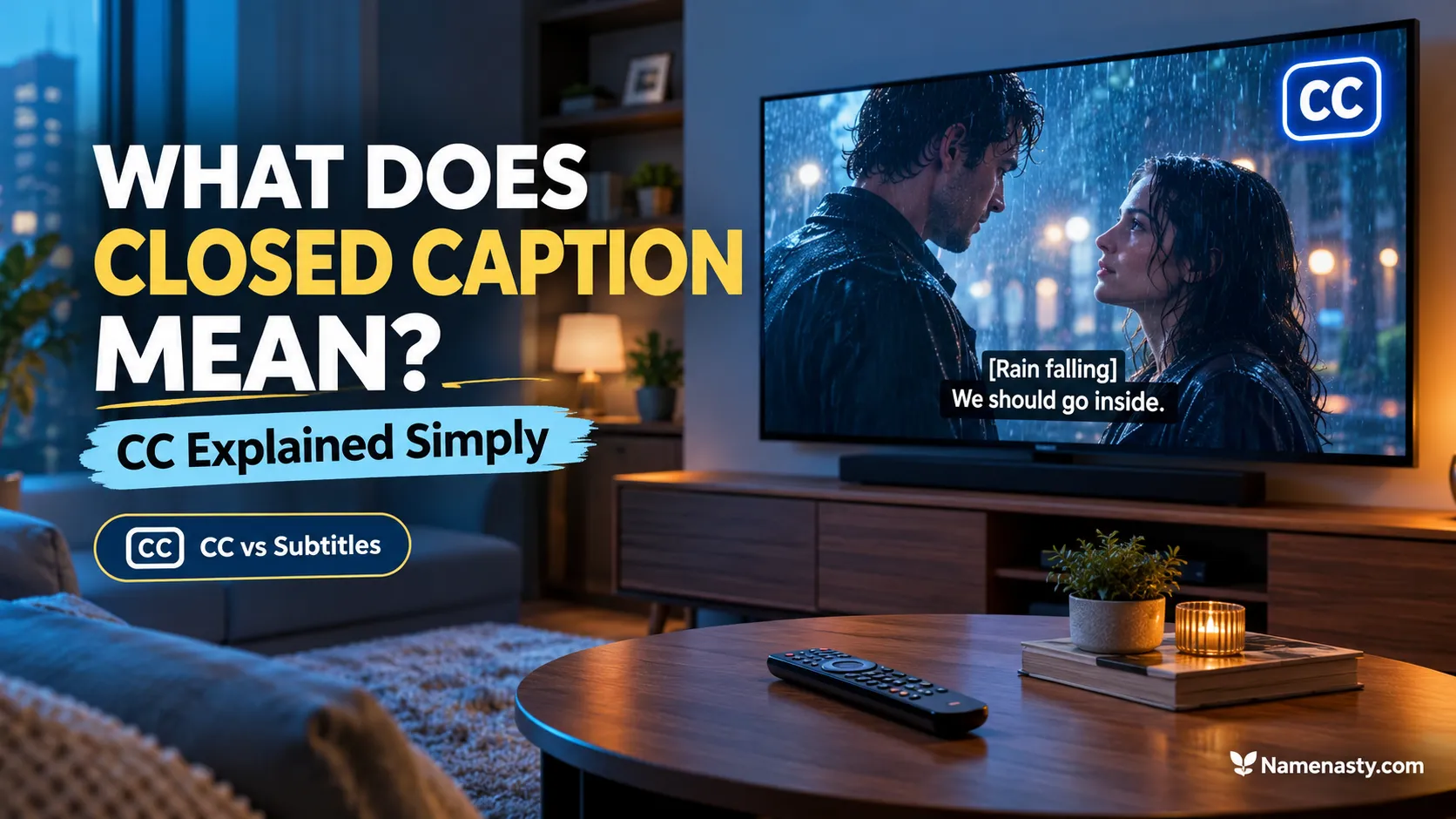
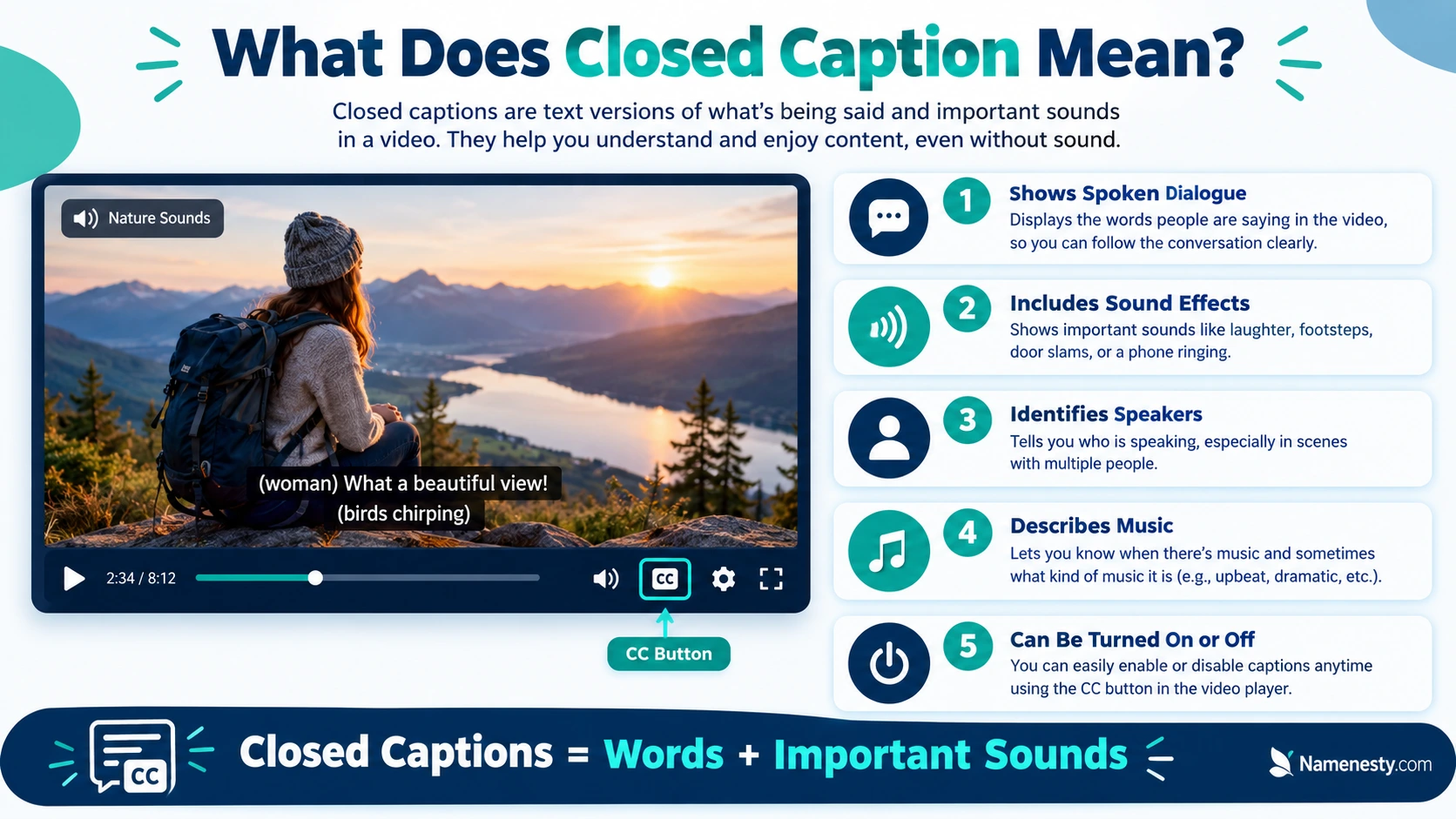
Closed captions are optional, synchronized text displayed on a screen to represent spoken dialogue and important audio information, including music, sound effects, and speaker identification. They help people who are deaf or hard of hearing understand videos and also make content easier to follow when sound is unavailable or difficult to hear.
For example, a closed caption might display:
[Rain falling] Sarah: “I think we’re lost.” [Footsteps approaching]
Unlike ordinary dialogue-only subtitles, closed captions can describe meaningful sounds that viewers might otherwise miss.
In this complete guide, you’ll discover what closed captions mean, how they work, the difference between captions and subtitles, how to enable them on popular platforms, and how content creators can use them effectively.
Quick Answer: What Is Closed Captioning?
| Question | Quick answer |
| What does CC mean? | Closed Captions |
| What are closed captions? | Optional text representing speech and important sounds |
| Can viewers turn CC off? | Yes, when the player supports the caption track |
| Are captions and subtitles identical? | Not always; their purpose and audio coverage may differ |
| Who benefits from CC? | Deaf and hard-of-hearing viewers, people watching without sound, language learners, and many others |
| Where is CC used? | TV, streaming services, online videos, educational content, and social platforms |
| Are automatic captions always accurate? | No; they can contain transcription and timing errors |
Key takeaway: Closed captions make video content more accessible and understandable by turning important audio information into readable text.
1. What Does Closed Caption Mean? Simple Definition and Examples
The term closed caption refers to text that viewers can choose to display or hide while watching video content. The word “closed” describes this optional feature—not whether the captions are private, restricted, or unavailable.
According to the World Wide Web Consortium (W3C), captions represent speech and non-speech audio information needed to understand media content.
W3C
Understanding the meaning of closed captions
Imagine watching a mystery movie with the volume muted. A character suddenly turns around, frightened, but you cannot hear what caused the reaction.
With closed captions enabled, the screen might display:
- [Glass shattering]
- [Suspenseful music]
- Detective: “Who’s there?”
- [Footsteps approaching]
These descriptions help you understand what is happening beyond the visible action.
What makes closed captions different?
A complete closed-caption track can contain:
- Spoken dialogue: Words said by characters, narrators, or presenters.
- Speaker identification: Names or labels that clarify who is talking.
- Sound effects: Meaningful sounds such as a phone ringing or a door opening.
- Music descriptions: Information such as [Soft piano music].
- Vocal expressions: Laughter, gasping, crying, or whispering when important.
Not every sound needs to be described. Effective captions prioritize information that contributes to the meaning of the video.
Why is it called closed captioning?
The term distinguishes captions that viewers can switch on or off from open captions, which are permanently visible.
Closed captions generally require a compatible video player, television, streaming application, or device that can display the caption track.
Best use: Enable closed captions when you want to understand spoken content and meaningful audio without relying entirely on sound.
2. What Does CC Mean on TV, YouTube, Netflix, and Social Media?
Have you ever noticed a small CC symbol near a video player’s settings? That symbol usually indicates the availability of closed captions or a caption-related control.
However, caption options differ across platforms, and not every video provides the same level of accessibility.
What does CC mean on television?
On television, CC stands for Closed Captioning. It enables viewers to read dialogue and relevant sound descriptions while watching supported programming.
For example, a news broadcast might display:
News Anchor: “Heavy rainfall is expected tonight.”
Captions can be especially useful when watching television in a noisy room or when speech is difficult to hear.
What does CC mean on YouTube?
On YouTube, the CC button lets viewers enable or disable available caption tracks. Some captions are created and uploaded by video creators, while others are generated automatically using speech recognition.
YouTube warns that automatic captions may contain errors caused by accents, pronunciation, overlapping speech, or background noise.
YouTube Help
What does CC mean on Netflix?
On Netflix, caption options may include standard subtitles and Subtitles for the Deaf and Hard of Hearing (SDH).
SDH tracks typically include spoken dialogue and relevant audio descriptions, although availability varies by title, language, and season.
Netflix Help Center
What does CC mean on social media?
On TikTok, Instagram, and Facebook, CC may refer to automatic speech captions, creator-added captions, or accessible caption tracks.
Remember that social media post captions and closed captions are different. A post caption is the written description accompanying a photo or video. Closed captions represent audio information within the video itself.
3. How Do Closed Captions Work on Videos and Television?
Closed captioning works by synchronizing written text with the audio and displaying it at the appropriate moment during video playback.
The process may involve human transcription, speech-recognition software, or a combination of both.
How the captioning process works
Video with audio
Speech, music, and meaningful sounds
Audio transcription
Human captioner or speech recognition
Timing and editing
Match text with the right audio moments
Caption track
Stored or transmitted with the video
Viewer enables CC
Text appears in sync with playback
What are caption files?
Online video platforms often support timed-text formats such as SRT (SubRip Subtitle) and WebVTT.
These files contain text and timing information that tell the video player when each caption should appear.
For example, an SRT caption might look like this:
1
00:00:01,000 –> 00:00:03,500
Welcome to our video!
2
00:00:04,000 –> 00:00:06,000
[Upbeat music playing]
The timestamps allow the player to synchronize the captions with the video.
What about live closed captioning?
Live captioning happens during broadcasts, meetings, sports events, and online streams.
Professional real-time captioners and automated speech-recognition systems can create captions as people speak. Live captions may appear with a slight delay because speech must first be processed or transcribed.
4. Closed Captions vs Subtitles: What’s the Real Difference?
Closed captions and subtitles often look similar, but they do not always serve the same purpose.
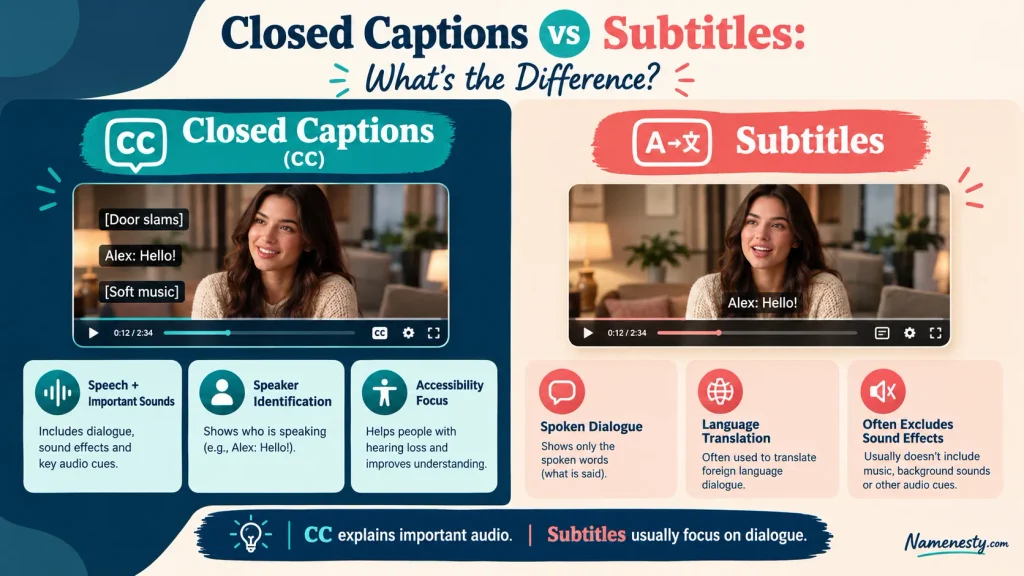
In common U.S. usage, closed captions are designed to convey dialogue and relevant audio information, while ordinary subtitles primarily display spoken dialogue, often in another language.
However, terminology varies internationally. Some countries use subtitles to describe both features.
W3C
Closed captions vs subtitles comparison
| Feature | Closed captions | Standard subtitles |
| Primary purpose | Audio accessibility | Dialogue comprehension or translation |
| Spoken dialogue | Yes | Yes |
| Meaningful sound effects | Usually included | Often omitted |
| Speaker identification | When needed | Less common |
| Music descriptions | When relevant | Often omitted |
| Language | Often same as audio | Same or different language |
| Can be switched off? | Yes | Usually, if selectable |
| Main audience | Anyone needing a text alternative to audio | Viewers needing dialogue text or translation |
Example: One scene, two formats
Closed captions
[Thunder crashes]
“We need to leave!”
[Dog barking]
Includes meaningful audio context.
Dialogue-only subtitles
“We need to leave!”
Displays the spoken words only.
What are SDH subtitles?
SDH stands for Subtitles for the Deaf and Hard of Hearing. They combine subtitle-style presentation with accessibility information such as sound descriptions and speaker labels.
For viewers who cannot hear the audio, SDH is generally more informative than dialogue-only subtitles.
Which should you choose? If you need to understand the full audio context, select a CC or SDH track when available. If you simply need dialogue translated, ordinary subtitles may be sufficient.
5. Open Captions vs Closed Captions: Key Differences Explained
Not every caption you see can be turned off. Some videos permanently display captions as part of the picture, while others offer a separate text track controlled by the viewer.
This distinction is especially important for social media creators, advertisers, and educators.
Open captions vs closed captions
| Feature | Open captions | Closed captions |
| Can viewers turn them off? | No | Yes |
| Permanently visible? | Yes | No |
| Usually embedded in video image? | Yes | No |
| Viewer controls appearance? | Usually not | Sometimes |
| Useful for silent autoplay? | Yes | Depends on player settings |
| Can offer multiple language tracks? | Not without separate video versions | Often possible |
When should you use open captions?
Open captions can work well for promotional clips, public displays, and short videos where viewers should see the text immediately.
However, permanently embedding captions reduces viewer control and may make translation or customization more difficult.
When should you use closed captions?
Closed captions are especially useful for long-form YouTube videos, educational content, webinars, and streaming media.
They allow viewers to decide whether to display the captions and may support different languages or presentation preferences.
For accessibility, both can be effective when they accurately communicate the necessary audio information.
6. Why Are Closed Captions Important for Accessibility?
Closed captions are an essential accessibility feature, not merely a viewing convenience.
They provide access to spoken and meaningful non-spoken audio for people who are deaf or hard of hearing. They can also help other viewers understand and process information.
Who benefits from closed captions?
Deaf and hard-of-hearing viewers: Captions make dialogue and meaningful audio events available as text.
People watching without sound: Captions help viewers follow videos in quiet workplaces, libraries, and public transport.
Language learners: Reading synchronized dialogue can help learners recognize unfamiliar words and follow pronunciation.
Students and educators: Captions can support note-taking, review, and comprehension of instructional videos.
Viewers with different processing preferences: Some people find written information easier to follow than spoken audio alone.
Are closed captions legally required?
Requirements depend on the country, content, platform, and type of organization.
In the United States, FCC rules establish captioning obligations and quality standards for covered television programming. The standards address accuracy, synchronization, completeness, and placement.
LII / Legal Information Institute
For web accessibility, WCAG 2.2 Success Criterion 1.2.2 requires captions for prerecorded audio content in synchronized media, subject to its stated exception.
W3C
Not every personal social media upload is automatically subject to the same legal obligations, but providing accurate captions is still a strong accessibility practice.
Four qualities of good captions
- Accurate: Captions correctly represent what is spoken and heard.
- Synchronized: Captions appear when the corresponding audio occurs.
- Complete: Important dialogue and sound information are not missing.
- Readable: Text is legible and does not unnecessarily obscure important visuals.
These principles are useful for anyone creating accessible video content.
7. What Do Closed Captions Look Like? Real Examples Explained
Closed captions can contain much more than spoken dialogue. Their wording and formatting help communicate information that would otherwise be available only through audio.
Below are 15 original examples showing how different audio events can be captioned.
15 examples of closed captions
| # | Caption example | What it communicates |
| 1 | [Door creaks open] | A door opens audibly |
| 2 | [Audience applauding] | Crowd reaction |
| 3 | [Soft piano music] | Background music |
| 4 | [Phone vibrating] | Device notification |
| 5 | Emma: “Are you ready?” | Speaker and dialogue |
| 6 | [Thunder rumbling] | Weather-related sound |
| 7 | [Footsteps getting closer] | Approaching movement |
| 8 | [Baby crying] | Vocal sound |
| 9 | [Engine starting] | Vehicle activity |
| 10 | [Laughter] | Emotional reaction |
| 11 | [Whispering] “Follow me.” | Delivery of speech |
| 12 | [Glass breaking] | Sudden sound effect |
| 13 | [Suspenseful music intensifies] | Musical change |
| 14 | [Dog barking in distance] | Animal sound and location |
| 15 | [Alarm beeping repeatedly] | Repeated warning sound |
How should sound effects be written?
Use concise, recognizable descriptions that accurately reflect the audio.
For example, [Footsteps approaching] is often more informative than [Noise], while [Soft instrumental music] gives useful context without inventing a particular song or instrument.
Avoid adding interpretations that the audio does not support. A caption should represent what viewers can hear, not introduce unsupported details.
Do closed captions include emojis?
Professional accessibility captions generally favor clear written descriptions over decorative emojis.
For social media, an emoji might support the surrounding presentation, but it should not replace essential speech or sound information.
Creator tip: Make captions understandable even when someone watches your video with the sound completely muted.
8. How to Turn Closed Captions On or Off on Any Device
Turning closed captions on is usually straightforward, but the exact process depends on the device, app, and video player.
The most common places to find caption controls are the CC icon, subtitle menu, playback settings, and accessibility settings.
How to enable closed captions on a smart TV
- Start playing a program that supports captions.
- Open the playback menu using your remote.
- Find Captions, Subtitles, or Accessibility.
- Select the available caption track.
- Return to playback and check whether text appears.
If you are watching through a streaming application, the caption settings may be inside the app rather than the television’s general settings.
How to enable closed captions on an iPhone
On supported apps and video players:
- Open the video and display its playback controls.
- Select the captions or subtitles menu.
- Choose an available caption language or SDH option.
You can also check iPhone accessibility settings under Settings → Accessibility → Subtitles & Captioning for supported system caption preferences.
How to enable captions on Android
On supported Android devices, open Settings → Accessibility and look for caption-related settings.
Some devices offer Caption preferences or Live Caption. Live Caption is a device feature that generates captions from supported audio; it is not the same as a caption track supplied with a video.
How to turn captions off
Open the same caption menu and choose Off or disable the CC control.
If text remains visible, it may be permanently embedded as open captions or displayed by another device-level feature.
9. How to Enable Closed Captions on YouTube and Netflix
YouTube and Netflix are among the most familiar places where viewers encounter captions. Both offer caption-related controls, although their options and interfaces differ.
How to turn on YouTube closed captions
On desktop:
- Open a YouTube video.
- Click the CC button when available.
- Open Settings to explore subtitle or caption language options.
- Choose the available language.
- Click CC again to disable captions.
On mobile, tap the video to reveal the controls, then use the caption icon or the settings menu.
If the video has no caption track, the option may be unavailable.
How to turn on Netflix closed captions
- Play a movie or television episode.
- Open the playback controls.
- Select Audio & Subtitles or the equivalent menu.
- Choose an available caption or SDH track.
- Resume playback.
Netflix also allows some viewers to adjust subtitle and caption appearance, including font size, shadow, and background color, depending on their device and region.
Netflix Help Center
YouTube vs Netflix caption features
| Feature | YouTube | Netflix |
| Closed-caption support | Yes | Yes |
| Automatic captions | Available on eligible videos | Not generally presented as a viewer-facing automatic-caption feature |
| Creator-uploaded caption tracks | Yes | Content-provider-managed |
| Multiple language options | Varies by video | Varies by title |
| Caption appearance settings | Player-dependent | Device- and account-dependent |
| Viewer control | Generally yes | Generally yes |
For either platform, the most useful caption track is the one that accurately represents the audio in a language you understand.
10. What Do Closed Captions Mean on TikTok, Instagram, and Facebook?
On social media, captions have two distinct meanings: text associated with a post and text representing speech or audio inside a video.
Understanding the difference helps creators make more accessible content.
Closed captions on TikTok
TikTok supports captioning features that can display spoken words as text. Depending on the creator tools and playback experience, captions may be automatically generated or edited by the creator.
A creator filming a recipe tutorial might use captions to show spoken instructions such as:
“Add two tablespoons of olive oil.”
This helps viewers follow the instructions without turning on the sound.
Closed captions on Instagram Reels
Instagram offers caption-related tools for eligible videos and Reels.
Creators may use automatically generated captions or text overlays to make spoken content easier to follow. Feature availability can vary by account, language, region, and app version.
For a personal branding video, a useful spoken line might be captioned:
“Your first client doesn’t need perfection. They need a solution.”
The text should match the audio rather than simply repeat an unrelated motivational quote.
Closed captions on Facebook videos
Facebook supports captions for certain video formats and publishing workflows.
Creators should check that the resulting captions are available to viewers, accurately represent speech, and remain readable on mobile devices.
Platform-specific caption recommendations
| Platform | Useful approach | What to check |
| TikTok | Clear speech captions for short videos | Accuracy and text positioning |
| Instagram Reels | Captions that remain readable on mobile | Avoid interface overlays |
| Accessible captions for videos and longer clips | Playback and language availability | |
| YouTube Shorts | Correct automatic captions or uploaded caption tracks | Timing and transcription errors |
| YouTube long-form | Edited, synchronized caption tracks | Complete speech and sound coverage |
Do closed captions increase social media engagement?
Captions can make videos easier to understand in sound-off environments and more accessible to a wider audience.
However, there is no universal engagement increase that applies to every platform or video. Watch time, completion rate, retention, and engagement depend on many factors, including the topic, audience, editing, and content quality.
Use captions to improve the viewing experience first, then measure their effect using your own analytics.
11. Automatic vs Manual Closed Captions: Which Is More Accurate?
Automatic captioning has made video accessibility easier to implement, but convenience does not guarantee accuracy.
The best choice depends on your content, production process, audience, and need for reliability.
What are automatic closed captions?
Automatic captions are generated by speech-recognition software that analyzes spoken audio and produces text.
They can be useful for tutorials, interviews, informal videos, and large amounts of content that would otherwise require substantial transcription work.
However, automatic systems may struggle with background noise, unfamiliar terminology, multiple speakers, or unusual names.
What are manual closed captions?
Manual captions are created or carefully edited by a person.
A human captioner can correct transcription mistakes, identify speakers, add meaningful sound descriptions, and improve timing.
Automatic vs manual captions
| Factor | Automatic captions | Manual or human-edited captions |
| Speed | Often fast | Usually takes longer |
| Initial effort | Lower | Higher |
| Accuracy | Variable | Potentially higher after review |
| Sound descriptions | May be missing | Can be added deliberately |
| Speaker labels | May be inconsistent | Can be checked |
| Specialized terminology | More error-prone | Can be verified |
| Best for | First drafts and routine content | Important, complex, or high-stakes content |
Which captioning method should you choose?
For casual videos, automatically generated captions followed by careful editing may be sufficient.
For legal, medical, educational, or other high-stakes content, a thorough human review is especially important.
YouTube itself recommends reviewing and correcting automatic captions rather than assuming they are accurate.
- Explore More: https://namenesty.com/cheating-captions/
YouTube Help
Best practice: Treat automatic captions as a starting point, not a finished accessibility product.
12. How to Create Closed Captions for Videos and Social Media
Creating effective closed captions requires more than converting speech into text. Captions must be accurate, synchronized, readable, and useful to people who cannot hear the original audio.
Whether you publish YouTube tutorials, Instagram Reels, TikTok videos, online courses, or business presentations, a consistent captioning workflow improves accessibility.
Step-by-step guide to creating closed captions
- Prepare your video. Use the clearest available audio recording and reduce unnecessary background noise.
- Transcribe the speech. Write down the spoken words accurately, including important names, numbers, and terminology.
- Identify speakers. Add speaker labels when viewers may otherwise struggle to tell who is talking.
- Describe meaningful sounds. Include relevant music, laughter, alarms, and other sounds that contribute to understanding.
- Synchronize the text. Match the caption timing to the corresponding speech and audio events.
- Check readability. Use clear text, appropriate line breaks, and enough display time for viewers to read.
- Export or upload captions. Use a supported caption format such as SRT or WebVTT where available.
- Test the published video. Watch it with sound muted to confirm that important information is accessible.
15 practical caption-writing examples for video creators
These examples demonstrate accessible audio transcription across different types of social media content. They are not decorative Instagram captions; they are sample closed captions representing spoken audio and sounds.
| Content type | Sample closed caption |
| 1. Cooking tutorial | Chef: “Let the sauce simmer for ten minutes.” |
| 2. Travel vlog | [Ocean waves crashing against the shore] |
| 3. Fitness video | Trainer: “Keep your back straight as you lift.” |
| 4. Comedy clip | [Audience bursts into laughter] |
| 5. Product review | Reviewer: “The battery lasted through my workday.” |
| 6. Pet video | [Puppy whimpering softly] |
| 7. Educational Reel | Teacher: “Photosynthesis converts light into chemical energy.” |
| 8. Makeup tutorial | Creator: “Blend the foundation toward your jawline.” |
| 9. Business presentation | Presenter: “Our next priority is improving customer support.” |
| 10. Motivational speech | Speaker: “Progress begins with one small action.” |
| 11. Gaming video | [Rapid footsteps and distant explosions] |
| 12. Music performance | [Acoustic guitar playing gently] |
| 13. Interview | Interviewer: “What inspired your first business?” |
| 14. Storytelling video | Narrator: “That was the moment everything changed.” |
| 15. Nature documentary | [Birds chirping as wind rustles the leaves] |
Each caption should be used only when it accurately represents the audio in the corresponding video.
Common captioning mistakes to avoid
One frequent mistake is relying on automatically generated captions without checking them. Speech-recognition systems may confuse similar-sounding words or misidentify names.
Another mistake is placing captions over essential information, such as a product demonstration, presentation slide, or another text element.
Creators should also avoid using tiny fonts, overly decorative typography, distracting animations, and captions that disappear before viewers can finish reading.
Caption quality checklist
Before publishing your video
0 of 8 checked
Every spoken sentence is accurately represented
Important sounds and music are described
Speaker changes are clear when needed
Captions appear at the correct time
Text is readable on mobile screens
Captions do not hide essential visuals
Spelling, punctuation, and names are checked
The finished video is tested with sound muted
Reset checklist
A reliable captioning process combines accurate transcription, meaningful sound descriptions, clear timing, and real-world playback testing.
13. What Are the Benefits of Closed Captions for Viewers and Creators?
Closed captions benefit more than one audience. They can improve access to video content, support comprehension, and make videos more convenient to watch in different environments.
For creators, they also encourage better communication and more inclusive publishing practices.
Benefits for viewers
1. Better accessibility: Deaf and hard-of-hearing viewers can access spoken dialogue and important sounds.
2. Easier sound-off viewing: People can follow videos in public places, offices, or quiet environments.
3. Support for language learning: Reading dialogue while listening can help viewers connect written and spoken words.
4. Improved comprehension: Captions may make technical explanations, unfamiliar accents, and complex terminology easier to follow.
5. Greater viewing flexibility: Viewers can decide whether to use captions based on their needs and preferences.
Benefits for content creators
1. More inclusive content: Accessible captions help make videos usable by people with different hearing abilities.
2. Clearer communication: Caption editing encourages creators to identify unclear speech and confusing terminology.
3. Better sound-off experiences: Viewers can understand spoken information even when audio playback is inconvenient.
4. Opportunities for multilingual accessibility: Caption tracks can support additional languages when accurate translations are provided.
5. More reusable content: Accurate transcripts can help creators prepare summaries, educational notes, and other supporting materials.
Do closed captions help SEO?
Closed captions may support video discoverability when platforms can access and process the associated text. They can also make video content easier for viewers to understand.
However, adding captions does not guarantee higher Google rankings, increased views, or greater social media engagement.
For search optimization, creators should combine accurate captions with descriptive video titles, useful descriptions, relevant chapters where supported, and high-quality content.
Which captions are best for different content types?
| Content type | Recommended captioning approach | Primary benefit |
| Educational videos | Accurate, edited captions | Clarity and learning |
| Entertainment videos | Dialogue plus meaningful sound descriptions | Full story comprehension |
| Interviews | Speaker labels and precise dialogue | Easy conversation tracking |
| Social media Reels | Readable, well-positioned captions | Mobile and sound-off viewing |
| Product demonstrations | Clear technical terms and instructions | Understanding product details |
| Webinars | Synchronized live or prerecorded captions | Participation and accessibility |
| Business presentations | Accurate speech and relevant audio cues | Inclusive professional communication |
The best captioning approach is the one that accurately communicates the video’s audio information to its intended audience.
14. Why Are Closed Captions Not Working? Common Problems and Fixes
Closed captions sometimes disappear, show the wrong language, lag behind speech, or fail to appear entirely.
These problems can result from unavailable caption tracks, player settings, device compatibility, or technical issues with the video.
Common closed-caption problems
| Problem | Possible cause | What to try |
| CC button is missing | Captions are unavailable or controls are hidden | Check another video and reveal playback controls |
| Captions do not appear | Caption track is not enabled | Open the caption or subtitle menu |
| Captions are delayed | Timing issue or live transcription delay | Restart playback or report the issue |
| Captions show incorrect words | Automatic transcription error | Choose another track or notify the creator |
| Captions are too small | Appearance settings | Increase caption size where supported |
| Wrong caption language | Incorrect language selection | Select the intended language |
| Captions cover important visuals | Poor caption placement | Adjust settings if possible or report the problem |
| Captions will not turn off | Open captions or device-level captioning | Check whether text is embedded or Live Caption is active |
Why is the CC button greyed out?
A greyed-out CC button often indicates that a caption track is unavailable for the selected video or playback environment.
Try another video that is known to offer captions. If captions work there, the issue may be specific to the original content.
Why are my captions out of sync?
Captions can fall out of sync because of incorrect timing information, streaming problems, or delays during live transcription.
For prerecorded videos, try refreshing the player. If the problem persists, the caption track itself may require correction.
Why are Netflix subtitles too large?
Netflix notes that caption appearance can be influenced by both account settings and device-level accessibility settings. Adjusting one or both may resolve unusually large captions.
- Explore more:https://namenesty.com/summer-captions/
Netflix Help Center
What should creators do when captions are wrong?
Creators should review the affected section, correct the transcription, adjust timestamps where needed, and test the updated captions.
For recurring issues, improve audio recording quality and include human review in the publishing process.
15. People Also Ask
Closed captions are optional on-screen text that shows what people say and describes important sounds in a video. Viewers can usually turn them on or off.
CC stands for Closed Captions or Closed Captioning, depending on the context.
Closed captions generally include speech and important sound information, while ordinary subtitles often focus on spoken dialogue or translation. The terms can overlap depending on the region and platform.
It is called closed captioning because the caption text is optional and can be enabled or disabled, unlike open captions that remain permanently visible.
CC refers to closed-caption functionality. Netflix may offer SDH tracks that include dialogue, speaker identification, and meaningful sound descriptions.
CC is the caption control that lets viewers display or hide available caption tracks, including creator-provided or automatically generated captions.
No. They are essential for many deaf and hard-of-hearing viewers, but they can also help language learners, students, and people watching videos without sound.
Key Takeaways: What Does Closed Caption Mean?
Closed captions are a practical way to make video content more accessible, understandable, and convenient.
The most important points to remember are:
- CC means Closed Captions or Closed Captioning.
- Closed captions display speech and meaningful audio information as synchronized text.
- Closed captions can be switched on or off; open captions cannot.
- Ordinary subtitles and accessibility captions are related but not always identical.
- Automatic captions should be reviewed for accuracy.
- Clear timing, correct wording, and readable placement matter more than decorative styling.
Whether you are watching your favorite show, learning through online videos, or creating content for social media, understanding closed captions helps you make better viewing and publishing decisions.










2 thoughts on “What Does Closed Caption Mean? 7 Facts About CC”