Closed Captions vs Subtitles: 7 Key Differences Explained (2026)
Ever turned on subtitles while watching Netflix or YouTube and wondered why some videos show sound effects while others display only dialogue? You’re not alone. The difference between closed captions vs subtitles is more important than it first appears, especially for accessibility, language translation, and content creation. Closed captions communicate speech and meaningful sounds, while traditional subtitles primarily focus on dialogue. But there’s more to the story. In this guide, you’ll discover 7 key differences, real-world examples, and practical tips for choosing the right option. Whether you’re a viewer or creator, understanding both can transform your video experience.
Have you ever watched a movie on Netflix, turned on the CC button on YouTube, or noticed text appearing automatically on TikTok? You might have wondered whether closed captions and subtitles are actually the same thing.
They look similar, but they don’t always serve the same purpose.
Understanding closed captions vs. subtitles matters whether you’re watching international movies, creating YouTube videos, editing Instagram Reels, or making educational content accessible.
Closed captions typically include spoken dialogue, speaker identification, and important sounds. Subtitles often focus on dialogue and may translate it into another language. However, the terminology varies by country and platform.
In this guide, you’ll discover seven important differences, real examples, accessibility requirements, video formats, platform instructions, and practical tips for choosing the right option.
Quick Answer: Closed Captions vs Subtitles
Closed captions reproduce spoken words and meaningful audio information, including sound effects, music cues, and speaker identification. Subtitles typically display dialogue, either in the original language or translated into another language.
The simplest distinction: captions are designed to communicate essential audio information, while conventional subtitles primarily communicate speech. Both can improve the viewing experience, and accessible subtitles can serve both purposes.
W3C
+1
At a glance
| Feature | Closed Captions | Subtitles |
| Primary purpose | Audio accessibility | Dialogue comprehension or translation |
| Spoken words | Yes | Yes |
| Sound effects | Relevant sounds included | Often omitted |
| Speaker labels | When needed | Sometimes |
| Language | Usually original audio language | Original or translated |
| Can turn off? | Yes | Depends on how delivered |
1. Closed Captions vs Subtitles: What’s the Difference?
The biggest difference between closed captions and subtitles is the information they are intended to communicate.
Captions help viewers understand the audio experience even when they cannot hear it. Conventional subtitles help viewers follow spoken dialogue, especially when the language is unfamiliar.
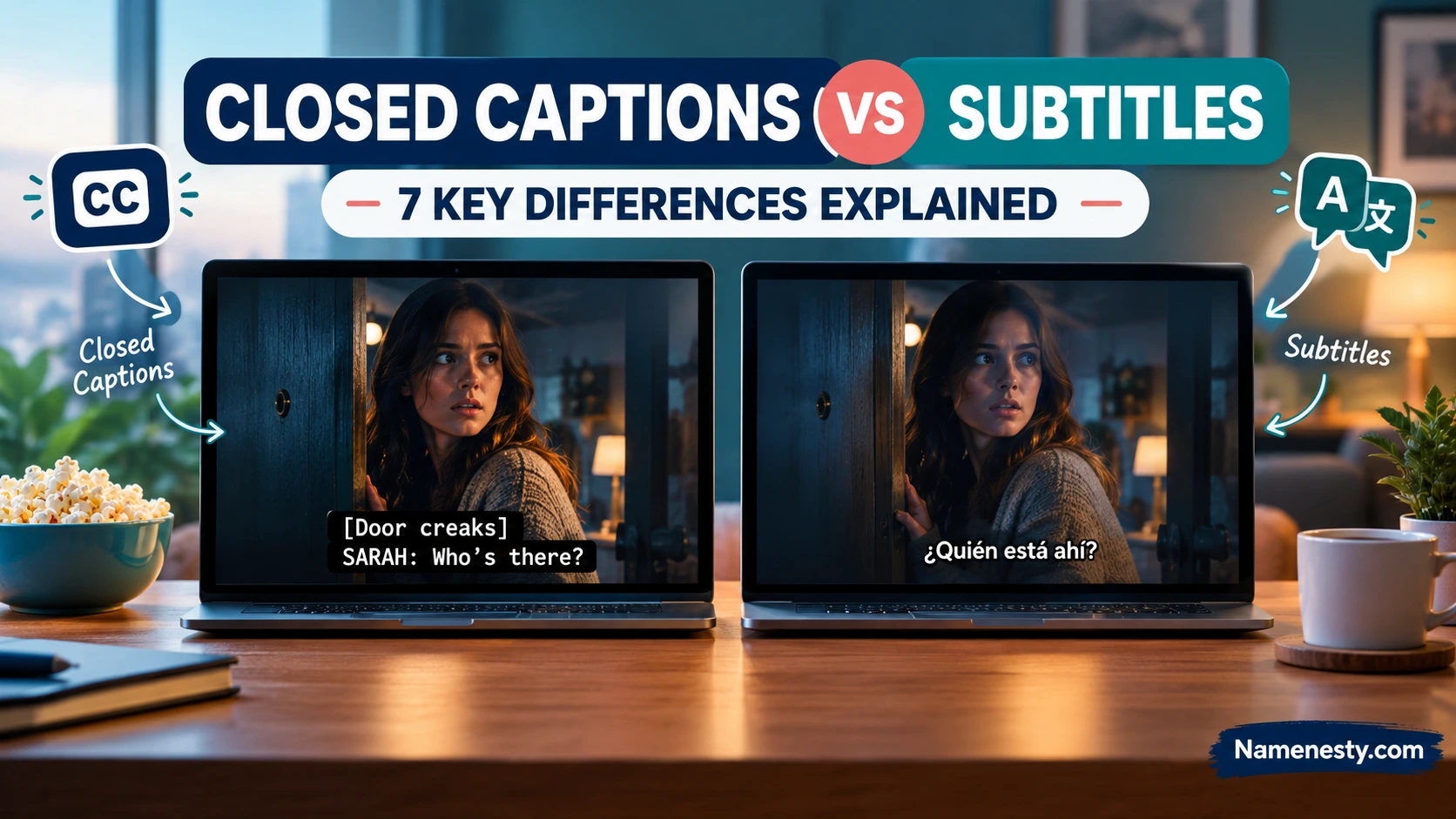
For example, imagine a movie scene in which a character whispers, a dog barks, and thunder crashes outside.
A closed caption track might display:
CLOSED CAPTIONS (CC)
[Thunder rumbling]
[Dog barking]
SARAH: I think someone’s outside.
A conventional Spanish subtitle track might display:
SPANISH SUBTITLES
Creo que hay alguien afuera.
Both communicate dialogue, but the captions also describe important sounds that contribute to the scene.
Why the terminology can be confusing
In the United States, closed captions often refer to accessible text tracks, while subtitles commonly refer to translated dialogue.
In other regions, the word subtitles can describe both.
The World Wide Web Consortium (W3C) recognizes this difference in terminology. It also explains that same-language subtitles can provide accessibility when they include the information viewers need.
W3C
+1
Key takeaway: Judge the content of a text track, not just whether its menu label says CC or subtitles.
2. What Are Closed Captions (CC) and How Do They Work?
Closed captions are synchronized text that viewers can typically switch on or off while watching a video.
They communicate spoken language and important audio details, making video content more accessible to people who are deaf or hard of hearing.
What do closed captions include?
High-quality closed captions can contain:
- Spoken dialogue and narration.
- Speaker names or labels when the speaker is unclear.
- Relevant sound effects, such as [door slams].
- Meaningful music descriptions, such as [suspenseful music].
- Important vocal sounds, including laughter, gasping, or crying.
Not every background sound needs a caption. The goal is to communicate audio information necessary for understanding the content.
How closed captioning works
A caption track contains text linked to timestamps. A compatible video player displays each segment at the appropriate moment.
When viewers select the CC control, the player renders the captions over or near the video.
Depending on the platform and format, viewers may also be able to customize the text size, color, background, and positioning.
Why is it called closed captioning?
The word closed means the caption display can be enabled or disabled by the viewer.
It does not mean that the captions are private, restricted, or available only to certain people.
Closed captions are especially useful for online classes, interviews, documentaries, news, training videos, and entertainment.
For a deeper explanation, see our related guide: What Does Closed Caption Mean?
3. What Are Subtitles and Why Are They Used?
Subtitles are timed text displayed on a screen to represent spoken dialogue.
They are especially useful for viewers who understand a different language from the one spoken in a video. However, subtitles can also appear in the original language.
Two main types of subtitles
Same-language subtitles (intralingual subtitles): These display speech in the language being spoken.
For example, an English-language film might offer English subtitles to help viewers follow unfamiliar accents or complex dialogue.
Translated subtitles (interlingual subtitles): These translate dialogue from one language into another.
For example, a Korean drama might offer English, French, Arabic, and Spanish subtitles.
Why do people use subtitles?
Subtitles help viewers follow international entertainment, learn languages, understand unfamiliar accents, and watch content in environments where listening is difficult.
They also allow creators to communicate with audiences beyond their original language.
Are subtitles always translations?
No. This is one of the most common misunderstandings.
Subtitles can be in the same language as the original audio or in a different language.
The distinction between subtitles and captions depends partly on the terminology used by a platform or region and on whether essential non-speech sounds are included.
W3C
+1
4. 7 Key Differences Between Closed Captions and Subtitles
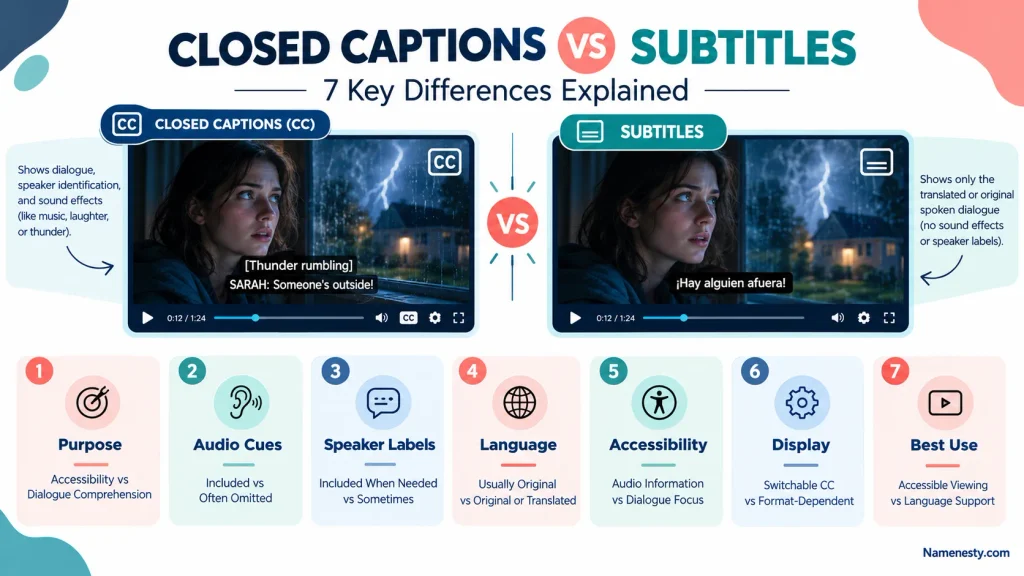
Although both appear as synchronized text, seven practical differences help explain their intended functions.
1. Primary purpose
Closed captions are primarily designed to make audio information accessible.
Conventional subtitles focus on helping viewers understand dialogue, often across language barriers.
2. Audio descriptions
Captions include important non-speech sounds, such as a telephone ringing, footsteps approaching, or music changing the mood.
Dialogue-only subtitles may leave these details out.
3. Speaker identification
Captions identify speakers when the person speaking is not visually obvious.
Subtitles may identify speakers too, but conventional dialogue subtitles do not always include explicit speaker labels.
4. Language support
Captions commonly appear in the language of the original audio.
Subtitles frequently offer translations, although either type of track can support more than one language.
5. Accessibility
Complete, accurate captions support viewers who cannot hear the soundtrack.
Dialogue-only subtitles may not provide equivalent access if important sound information is missing.
6. Display and customization
Closed captions are switchable by definition.
Subtitles may also be switchable, but some are permanently embedded into the video. Styling and positioning options depend on the platform, file format, and player.
7. Typical use cases
Closed captions are particularly important for accessible education, workplace training, public information, and online video.
Subtitles are commonly associated with international films, multilingual streaming, language learning, and localized entertainment.
Remember: These are common functional differences, not universal rules. A well-designed SDH subtitle track can provide the same essential accessibility information as closed captions.
5. Closed Captions vs Subtitles: Real Examples Explained
Understanding the difference becomes easier when you compare the same scene across different text tracks.
Example 1: A dramatic movie scene
Film
Closed captions
[Glass shatters]
[Footsteps approaching]
MARK: Don’t move!
French subtitles
Ne bouge pas !
Captions communicate the approaching danger through sound, while the subtitles translate the dialogue.
Example 2: An educational video
Learning
Closed captions
TEACHER: Water boils at 100°C at standard atmospheric pressure.
[Timer beeps]
Spanish subtitles
El agua hierve a 100 °C a presión atmosférica estándar.
Both can support learning, but captions also communicate the timer sound when it is relevant.
Example 3: A music video
Entertainment
Closed captions
[Upbeat pop music]
♪ We’re chasing the morning light ♪
[Crowd cheering]
Spanish subtitles
♪ Perseguimos la luz del amanecer ♪
Captions can identify the music and crowd sounds, while translated subtitles communicate the song’s meaning.
These examples are illustrative. Actual captions and subtitles vary according to production standards, platform requirements, and editorial decisions.
6. Open Captions vs Closed Captions vs Subtitles
Another source of confusion is the difference between open captions and closed captions.
The words open and closed describe whether captions can be turned off. They do not describe the language or the amount of audio information included.
Open captions
Open captions are permanently visible. They are part of the displayed video and cannot be disabled by the viewer.
For example, a social media creator might export a Reel with captions permanently placed at the bottom.
Closed captions
Closed captions are delivered as a selectable text track.
Viewers can enable or disable them through the video player’s settings.
Subtitles
Subtitles can be delivered as a selectable track or permanently embedded into the video.
That means subtitles are not necessarily open or closed by default.
| Feature | Open captions | Closed captions | Subtitles |
| Can be turned off | No | Yes | Depends |
| Permanently visible | Yes | No | Sometimes |
| Can include sound effects | Yes | Yes | Depends on type |
| Supports translation | Possible | Possible | Common |
| Viewer styling controls | Usually limited | Often available | Platform-dependent |
The W3C distinguishes open and closed captions based on whether viewers can hide them.
W3C
+1
Which is better?
For a website or video player that supports accessible caption tracks, switchable captions usually offer more flexibility.
For short social media videos where a reliable selectable track is unavailable, open captions can make dialogue visible without requiring viewers to change settings.
However, burned-in captions must be checked for readability, positioning, and whether interface elements cover them.
7. Subtitles vs Closed Captions: Are They the Same?
They can include speaker identification, relevant sound effects, and music descriptions.
Example of SDH subtitles
[Door creaks open]
JAMES: Is anybody here?
[Eerie music intensifies]
This looks very similar to a closed caption track because it serves a similar accessibility purpose.
SDH vs closed captions comparison
| Feature | SDH subtitles | Closed captions |
| Dialogue | Included | Included |
| Relevant sounds | Included | Included |
| Speaker identification | Included when needed | Included when needed |
| Accessibility purpose | Yes | Yes |
| Typical delivery | Subtitle track | Caption track |
| Styling capabilities | Format-dependent | Format-dependent |
The main differences are often technical, regional, or related to the production workflow rather than the accessibility information itself.
What does English SDH mean on Netflix?
English SDH generally identifies an English subtitle track that includes accessibility information beyond dialogue.
For someone who wants to follow both speech and important sounds, an SDH track is usually preferable to a dialogue-only subtitle track.
8. Closed Captions vs Subtitles for Accessibility and WCAG Compliance
Accessibility is one of the most important reasons to understand the difference between captions and subtitles.
A video may contain information that cannot be understood from dialogue alone.
A fire alarm, a character laughing off-screen, or a change in music can all influence the meaning of a scene.
Captions help communicate those details to viewers who cannot hear them.
Who benefits from captions?
Captions are especially important for people who are deaf or hard of hearing, but they can also benefit:
- People watching in noisy environments.
- Viewers who prefer reading alongside listening.
- People learning a language.
- Students reviewing technical explanations.
- People who have difficulty processing speech.
- Viewers watching without sound.
What does WCAG say about captions?
The Web Content Accessibility Guidelines (WCAG) provide internationally recognized standards for web accessibility.
Two relevant success criteria are:
WCAG 1.2.2 — Captions (Prerecorded), Level A: Captions are required for prerecorded audio content in synchronized media, subject to the standard’s stated exception.
WCAG 1.2.4 — Captions (Live), Level AA: Captions are required for live audio content in synchronized media.
Meeting a particular WCAG level depends on the full set of applicable requirements, not captions alone.
W3C
+1
What makes captions accessible?
Effective captions should be accurate, synchronized, readable, and sufficiently complete to communicate important audio information.
A useful quality checklist includes:
Caption accessibility checklist
0 of 7 checked
Spoken dialogue is accurate
Captions are synchronized with audio
Important sound effects are described
Speakers are identified when necessary
Text has adequate contrast and readable timing
Captions do not obscure essential visual information
Names, numbers, and technical terms are checked
Copy checklist
Are captions legally required?
Requirements depend on the jurisdiction, industry, type of content, and applicable law.
For example, some television and online video programming in the United States is subject to Federal Communications Commission captioning rules. Other organizations may have accessibility duties under disability laws, procurement rules, or contractual requirements.
Adding subtitles alone does not automatically establish legal compliance.
For accessibility guidance, consult the W3C Web Accessibility Initiative.
9. Closed Captions vs Subtitles on Netflix, YouTube, and Streaming Services
Streaming services have made captions and subtitles much easier to access. However, the labels, language choices, and customization features can differ between platforms.
Netflix: Subtitles, CC, and SDH
On Netflix, viewers may encounter language options labeled with accessibility indicators such as CC or SDH.
When choosing between regular English subtitles and an English accessibility track, consider whether you need important sound information as well as dialogue.
To change the text track:
- Open a movie or episode.
- Access the Audio & Subtitles menu.
- Select your preferred language or accessibility option.
- Resume playback and check whether the track meets your needs.
Available options vary by title, device, and region.
YouTube: How closed captions work
YouTube supports both creator-uploaded text tracks and automatically generated captions.
To enable captions while watching:
- Open a YouTube video.
- Select the CC icon if available.
- Open Settings to review language options.
- Choose a suitable track or turn captions off.
YouTube’s automatic captions use speech recognition. Their accuracy can vary with accents, pronunciation, audio quality, and background noise.
YouTube Help
+1
Streaming platform comparison
| Platform | Common text options | Best approach |
| Netflix | Subtitles, CC, SDH | Choose an accessibility track when sound cues matter |
| YouTube | Captions, translated subtitles | Prefer reviewed captions over unedited automatic text |
| Disney+ | Subtitles and accessibility tracks | Check the available language and accessibility labels |
| Amazon Prime Video | Subtitles and captions | Review available tracks in playback settings |
| TikTok | Automatic or creator-added captions | Check transcription accuracy before publishing |
| Instagram Reels | Automatic or edited on-screen captions | Keep text readable and away from interface elements |
Creator tip: Test your video with the sound turned off. If viewers miss essential information, your text track may need improvement.
10. Captions vs Subtitles for TikTok, Instagram Reels, and Social Media
Social media adds another meaning to the word caption.
An Instagram caption can mean the written description beneath a post. A video caption means synchronized text representing speech and other audio information.
These are different content elements.
For example:
Instagram post description: “Three lessons I learned while starting my business.”
Video caption: “Lesson one: Start before you feel ready.”
The first introduces the post. The second reproduces words spoken in the video.
Instagram Reels caption tips
For short-form video, text should be easy to read on a small screen.
Use these practical techniques:
- Keep captions away from buttons and other interface overlays.
- Use a legible font with sufficient contrast.
- Synchronize text with speech.
- Break long sentences into readable segments.
- Include important sound cues when necessary.
- Preview the final video on a phone.
Avoid placing critical information so close to the bottom of the video that platform controls may cover it.
TikTok caption tips
TikTok creators often use animated text and automatic transcription to make short videos easier to follow.
That can improve the viewing experience, but decorative text is not necessarily a complete accessible caption track.
A text overlay saying “Wait for the ending!” does not replace accurate captions for the video’s dialogue.
- Explore More: https://namenesty.com/lana-del-rey-captions/
For multilingual audiences, consider translated subtitles or separate localized versions.
Facebook and other platforms
For Facebook videos, business content, and longer social media presentations, use supported caption-track options where available.
When a platform does not reliably support selectable captions for a particular publishing format, consider carefully edited open captions.
Can captions increase engagement?
Captions can make content easier to understand in sound-off environments and allow more people to follow your message.
However, no caption format guarantees more views, longer watch time, or higher engagement. Results depend on the audience, video quality, topic, and platform.
For related content creation ideas, explore Namenesty’s guides to TikTok captions and Instagram captions.
11. AI-Generated Captions vs Human Subtitles: Accuracy and Limitations
Artificial intelligence has made video transcription and subtitle generation faster.
Modern tools can detect speech, create timestamps, and sometimes translate text into multiple languages.
However, speed does not guarantee accuracy.
How AI captions work
Automatic speech recognition (ASR) software analyzes an audio recording and predicts the words being spoken.
Some systems also identify speakers, add punctuation, or estimate caption timing.
Translation software can then convert the transcript into other languages.
Common AI captioning mistakes
Automatic systems can struggle with:
- Unfamiliar names and specialized vocabulary.
- Regional accents and dialects.
- Overlapping speakers.
- Quiet speech and poor microphone quality.
- Background music.
- Sarcasm and contextual meaning.
- Important sound effects that speech recognition does not detect.
For example, an automatic system might transcribe “We need a new site” as “We need a new sight.”
Both phrases sound similar, but their meanings differ.
AI captions vs human-reviewed captions
| Factor | AI-generated | Human-reviewed |
| Initial production | Often faster | Usually more time-intensive |
| Transcription accuracy | Depends on audio and model | Can correct contextual mistakes |
| Speaker identification | May be unreliable | Can be verified |
| Sound descriptions | May be missing | Can be added intentionally |
| Translation quality | Requires review | Can account for cultural context |
| Best use | First draft and rapid workflows | Final publication and sensitive content |
Best workflow for 2026
Use AI to create an initial transcript, then review it against the original audio.
Correct mistakes, add missing sound information, check speaker labels, and adjust timing.
For educational, medical, legal, financial, or safety-related videos, subject-matter review is particularly important because small errors can change the meaning of important information.
YouTube explicitly recommends reviewing and editing automatically generated captions.
YouTube Help
12. SRT vs VTT: Caption and Subtitle File Formats Explained
If you create videos, understanding subtitle file formats can save time and prevent publishing errors.
Two widely used formats are SRT and WebVTT.
What is an SRT file?
SRT stands for SubRip Subtitle.
An SRT file usually contains numbered caption segments, timestamps, and the text displayed during each segment.
Example:
00:00:01,000 –> 00:00:03,500
Welcome to our video.
00:00:04,000 –> 00:00:06,500
[Audience applauding]
SRT is popular because its structure is simple, and many editing and video platforms support it.
What is a VTT file?
VTT stands for Web Video Text Tracks, commonly called WebVTT.
It is designed for timed text on the web and supports features such as cue settings and certain styling options.
Example:
WEBVTT
00:00:01.000 –> 00:00:03.500
Welcome to our video.
00:00:04.000 –> 00:00:06.500
[Audience applauding]
SRT vs VTT comparison
| Feature | SRT | VTT |
| File extension | .srt | .vtt |
| Timestamp decimal | Comma | Period |
| File header | Not normally required | WEBVTT |
| Basic dialogue timing | Yes | Yes |
| Web-native track support | Depends on player | Designed for HTML video tracks |
| Advanced cue positioning | Limited | Supported |
| Common use | Editing and subtitle delivery | Web players and online video |
Which format should you choose?
Choose SRT when your video platform or editor accepts it, and you need a straightforward subtitle file.
Choose VTT when working with HTML video players or when supported WebVTT cue features are useful.
Neither format automatically determines whether the text is a caption or subtitle. Both can contain dialogue and meaningful sound descriptions.
What about CEA-608, CEA-708, and TTML?
Professional captioning workflows may also use CEA-608, CEA-708, or TTML-based formats.
CEA-608 and CEA-708 are associated with television captioning systems, while TTML is an XML-based timed-text format used in various professional media workflows.
The right choice depends on the broadcaster, streaming service, distribution specification, and accessibility requirements.
13. How to Add Closed Captions and Subtitles to Videos
Creating captions does not have to be complicated.
The process generally involves preparing a transcript, synchronizing it with the video, reviewing accessibility details, and publishing the text track.
Step 1: Prepare an accurate transcript
Start with the exact spoken words.
Include names, technical terminology, and meaningful verbal expressions.
If you’re creating accessible captions, identify important non-speech audio.
Step 2: Synchronize the text
Each caption segment should appear when the corresponding audio occurs.
Avoid showing text too early or leaving it on screen long after the sound has ended.
Step 3: Add speaker identification
Identify speakers when viewers cannot reliably tell who is talking.
For example:
HOST: Welcome to today’s lesson.
GUEST: Thank you for inviting me.
Step 4: Include meaningful sound cues
Use concise descriptions such as:
[Phone ringing]
[Footsteps approaching]
[Audience laughing]
[Soft piano music]
The descriptions should help the viewer understand the content, not overwhelm the screen with unnecessary details.
Step 5: Export the appropriate format
Select the file format supported by your video player or distribution platform.
SRT and VTT are common starting points, but some platforms require different specifications.
Step 6: Upload captions to YouTube
According to YouTube’s creator instructions, you can add text tracks through YouTube Studio:
- Sign in to YouTube Studio.
- Select Subtitles from the menu.
- Choose your video.
- Add the appropriate language.
- Select the option to add a subtitle or caption track.
- Upload a supported file, use an available synchronization method, or enter the text manually.
- Review the result and publish.
YouTube also provides tools for editing caption text and timestamps.
YouTube Help
+1
Step 7: Review the published video
Watch the final version with sound enabled and disabled.
Check that text is readable, correctly timed, complete, and free of errors.
For translated subtitles, ask a proficient speaker to review the language when possible.
Common captioning mistakes to avoid
Avoid relying entirely on automatic captions, ignoring important sounds, using tiny fonts, overlapping important visuals, or assuming that translation alone provides complete accessibility.
A final review is often the difference between captions that merely exist and captions that genuinely help viewers.
14. Closed Captions or Subtitles: Which Should You Choose?
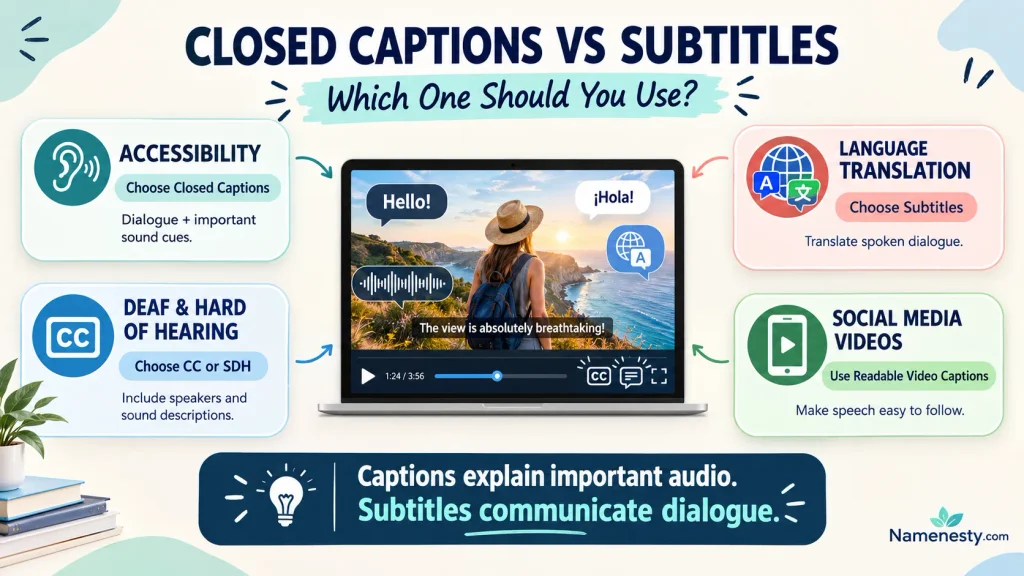
The right choice depends on what your audience needs to understand.
If the goal is accessibility for viewers who cannot hear the audio, choose complete captions or an equivalent accessible subtitle track.
If the goal is translating dialogue into another language, choose translated subtitles.
For many videos, the best solution is to offer both.
Interactive caption selection guide
What is your main goal?
Make a video accessible to people who cannot hear the audio
Help viewers understand a different language
Reach international audiences and support accessibility
Add readable text to short social media videos
Use closed captions or accessible SDH
Include accurate dialogue, speaker identification when needed, and meaningful non-speech sounds. Offer a switchable track where supported.
Copy recommendation
Best choice by video type
| Video type | Recommended approach |
| Educational tutorial | Original-language accessible captions |
| International film | Translated subtitles plus accessible tracks |
| Corporate training | Accurate captions and translations as needed |
| YouTube interview | Reviewed captions with speaker labels |
| Instagram Reel | Readable on-screen captions; selectable tracks where supported |
| Multilingual webinar | Captions and translated tracks |
| Product demonstration | Captions that describe relevant audio |
| Documentary | Accessible captions and multilingual subtitles |
What if your budget is limited?
Start by producing one accurate original-language caption track.
- Explore More: https://namenesty.com/4th-of-july-captions/
That track can become the foundation for translations, transcripts, and other accessibility improvements.
Prioritize accuracy and completeness before investing in decorative animation or complicated caption effects.
15. People Also Ask
Not always. Closed captions typically include dialogue and important audio information, while conventional subtitles primarily represent dialogue. However, terminology varies by region, and accessible subtitles can provide the same information as captions.
They are not universally called closed captions. The word closed specifically describes captions that viewers can turn on or off. Some platforms and regions use the terms captions and subtitles interchangeably.
CC stands for closed captions. When a video player displays a CC option, it generally indicates that a selectable caption track is available.
Choose captions or SDH if you need dialogue and important sound information. Choose translated subtitles if you want to understand speech in another language. The best option depends on your needs.
Yes, especially when they include accurate dialogue, speaker identification, and meaningful non-speech sounds. Dialogue-only subtitles may not provide complete access to the audio experience.
English subtitles often represent spoken dialogue. English CC typically includes dialogue plus important audio cues and speaker identification. Actual track content depends on the service.
English SDH means English Subtitles for the Deaf and Hard of Hearing. These tracks are designed to include important audio information beyond spoken words.
Conventional subtitles often omit music descriptions. Accessible captions and SDH tracks should communicate meaningful music cues when they contribute to understanding the video.
Conclusion: Understanding Closed Captions vs Subtitles
The difference between closed captions and subtitles comes down to the information each track provides and the audience it is designed to support.
Closed captions communicate spoken dialogue and meaningful audio details, helping viewers follow content without relying on sound. Subtitles commonly communicate dialogue, including translations for viewers who speak another language.
Neither is inherently better in every situation.
Key takeaways:
- Closed captions include important audio information beyond dialogue.
- Subtitles may be in the original language or translated.
- SDH subtitles support deaf and hard-of-hearing viewers.
- Open captions cannot be turned off; closed captions can.
- AI-generated text should be reviewed before publication.
- Accurate captions improve accessibility, usability, and the viewing experience.










1 thought on “Closed Captions vs Subtitles: What’s the Difference?”