Clear Caption Phone: Cost, Features, Eligibility & Complete Guide
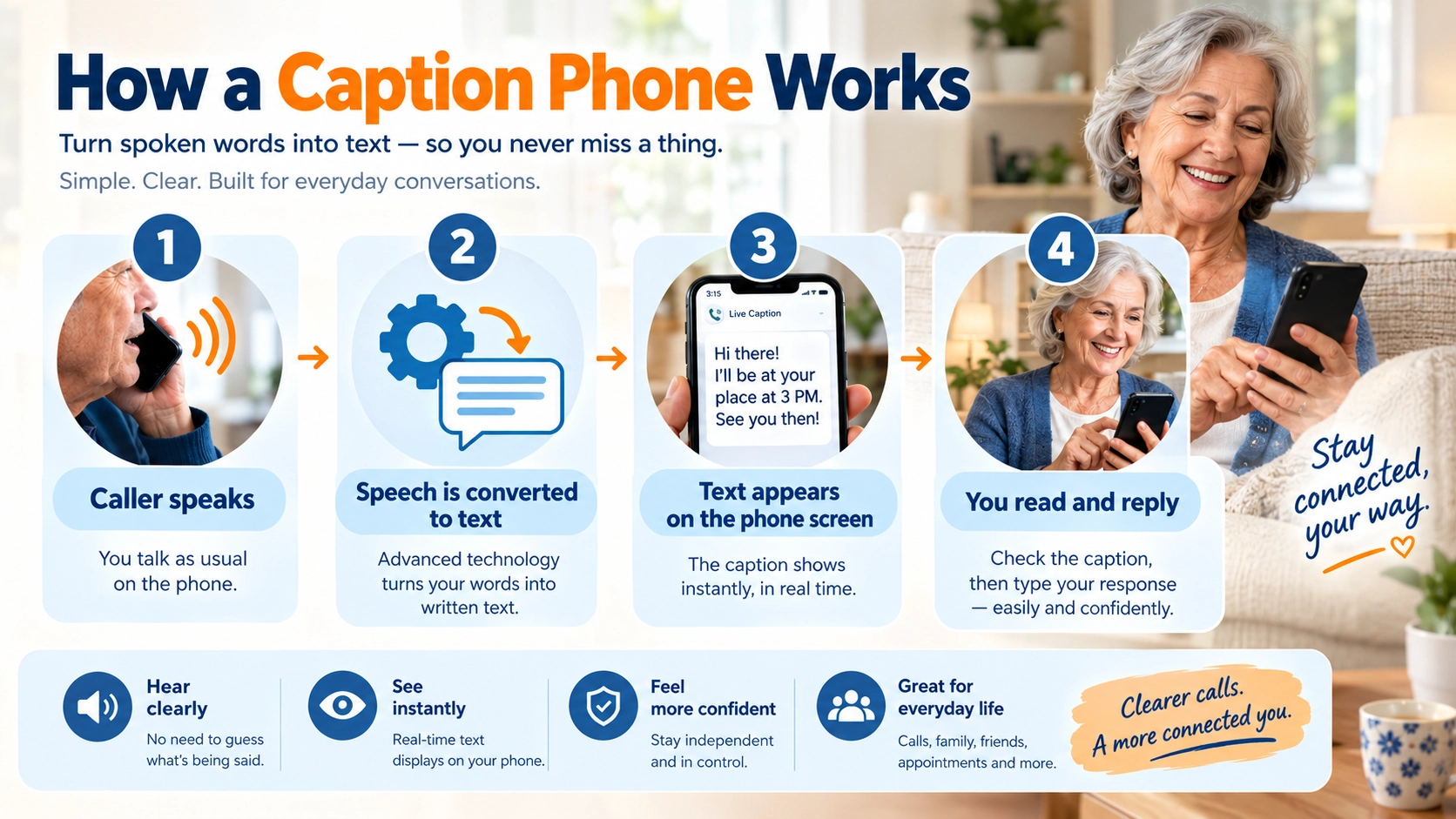
Calls shouldn’t feel like guesswork. If you’ve ever nodded along to a conversation you only half heard, asked someone to repeat themselves for the third time, or let a call go to voicemail because it felt like too much effort, you’re not alone. Hearing loss is common, and the phone is often where it hurts most: no lip reading, no body language, just a muffled voice. A caption phone changes that by displaying what the caller says as text on a screen, in real time. Here’s how it works, who it’s for, and what to check first.
If phone conversations have become difficult to follow because of hearing loss, a clear caption phone can provide another way to understand what the other person is saying.
Instead of relying only on sound, a captioned telephone displays the caller’s spoken words as text on a screen. ClearCaptions is one of the services currently offering this type of technology to qualifying U.S. residents.
But “free” is not the only question worth asking.
This guide covers the complete search journey in plain English.
It displays what the caller says as text on a screen while allowing the user to listen to the call. ClearCaptions says qualifying U.S. residents can receive its phone and captioning service at no cost.
What Is a ClearCaptions Phone and How Does It Work?
This allows the user to listen when possible and read the words when hearing alone isn’t enough.
15 quick takeaways
- A caption phone displays spoken conversation as text.
- ClearCaptions provides a dedicated captioning service.
- Captions appear during the conversation.
- The screen provides a visual backup to audio.
- Users can listen and read simultaneously.
- The technology uses speech-to-text processing.
- Some calls may involve a captioning agent.
- It is a telecommunications accessibility tool.
- ClearCaptions requires eligibility for its captioning service.
- The goal is more accessible telephone communication.
The FCC recognizes IP Captioned Telephone Service, or IP CTS, as a form of telecommunications relay service. Federal rules establish requirements around eligibility and the provision of captioned telephone service.
ClearCaptions Phone: Features, Benefits, and Who It’s For
ClearCaptions currently highlights features such as a large full-color touchscreen, adjustable caption size and color, volume controls, captioned voicemail, contact lists, favorites, a speakerphone, and a flashing notification light.
15 useful feature takeaways
- Large touchscreen display.
- Adjustable caption size.
- Adjustable caption color.
- Adjustable brightness.
- Adjustable screen angle.
- Built-in speakerphone.
- Volume controls.
- Captioned voicemail.
- Call history.
- Caption history within supported call logs.
- Favorite contacts.
- Speed-dial functionality.
- Incoming-call light notifications.
- Accessibility-oriented controls.
- Guided setup and support.
Who may find it useful?
A ClearCaptions phone may be relevant to someone who:
- Has hearing loss.
- Can hear some speech but struggles with clarity.
- Finds telephone conversations particularly difficult.
- Wants visual text during calls.
- Prefers a larger screen.
- Wants help with installation.
- Needs an accessible home telephone.
It is also potentially useful for family members researching communication options for an older parent or relative.
How Does a Captioned Phone Help People With Hearing Loss?
Hearing a sound and understanding speech are not always the same thing.
Someone may hear that another person is talking but still miss names, numbers, medical instructions, addresses, or individual words. A captioned telephone provides another information channel by displaying the spoken words as text.
The ADA’s telecommunications provisions recognize telecommunications relay services for people with hearing and speech disabilities, with the goal of functionally equivalent communication.
15 reasons users may value captioning
- It provides visual reinforcement.
- It can help with difficult words.
- It can make names easier to identify.
- It may help with numbers and dates.
- It can provide context when audio is unclear.
- It may reduce the need to repeatedly ask callers to repeat themselves.
- It can support longer conversations.
- It can help when speakers talk quickly.
- It provides an alternative to relying exclusively on amplification.
- It can complement hearing aids.
- It can support communication with medical offices.
- It may help with family calls.
- It may help with workplace calls.
- It can improve access to ordinary telephone communication.
- It gives the user both audio and visual information.
A caption phone does not mean that the user has to stop using hearing aids.
Is the ClearCaptions Phone Really Free for Eligible Users?
This is one of the biggest reasons people search for a ClearCaptions phone.
ClearCaptions says qualifying users can receive its phone, captioning service, setup, training, and ongoing support at no direct charge.
However, there is an important distinction between no direct charge for eligible captioning service and having absolutely no household telecommunications expenses.
15 cost facts to remember
- Eligible users may receive the ClearCaptions phone at no direct charge.
- Captioning service may also be provided without direct user charges.
- Funding comes through the TRS system.
- Eligibility requirements apply.
- The service is not universally available worldwide.
- Your existing internet service may still have its own bill.
- Other telephone or mobile services can have separate costs.
- Equipment eligibility does not automatically eliminate every household technology expense.
- ClearCaptions describes setup as no-cost for eligible customers.
- Users should confirm current eligibility before applying.
- Always distinguish “no cost to eligible users” from “no household expenses.”
Who Qualifies for a ClearCaptions Phone?
ClearCaptions currently states that prospective users generally need to meet several requirements.
The company says the service is available to qualified U.S. residents with hearing loss who need captions to communicate effectively by telephone, have home internet access, and can communicate in English.
15 eligibility reminders
- Hearing loss is a central eligibility factor.
- The hearing loss must affect telephone communication.
- The user must meet applicable IP CTS requirements.Captioning cannot simply be activated for anyone who wants it.
- Federal rules govern IP CTS.
- Eligibility should be verified before enrollment.
- Family members should not assume they personally qualify simply because they are applying for someone else.
- Requirements can change, so check current provider information.
This is particularly important because federal law restricts use of IP captioned telephone captions to registered users who meet applicable hearing-loss requirements.
How to Get a ClearCaptions Phone: Eligibility and Setup
ClearCaptions says it can determine eligibility, arrange the phone, provide setup, and provide training for qualifying users.
15 setup steps and tips
- Check whether you appear to meet the basic requirements.
- Contact ClearCaptions.
- Complete the eligibility process.
- Provide the required information.
- Complete any required certification.
- Confirm that you have reliable internet.
- Arrange delivery or installation.
- Prepare the location where you want the phone.
- Make sure the internet connection is accessible.
- Have important contacts available.
- Learn how to adjust captions.
- Test the speaker and volume.
- Test voicemail.
- Practice making and receiving calls.
- Save support information for future troubleshooting.
ClearCaptions promotes a guided installation and training experience, while independent coverage also identifies the hands-on setup as one of the service’s notable differentiators.
ClearCaptions Phone Features You Should Know Before Applying
Features matter because the best accessibility device is not necessarily the one with the longest specification list. It is the one whose interface matches the user’s communication needs.
ClearCaptions lists a full-color touchscreen, adjustable text, brightness controls, captioned voicemail, contact management, a speakerphone, and notification features.
15 features worth evaluating
- Large touchscreen — easier visual access.
- Caption size controls — useful for readability.
- Caption color controls — allows visual customization.
- Brightness adjustment — useful for different rooms.
- Screen-angle adjustment — helps positioning.
- Volume controls — supports audio access.
- Speakerphone — useful for hands-free calls.
- Captioned voicemail — turns saved messages into readable text.
- Call history — helps track calls.
- Favorites — speeds access to frequent contacts.
- Speed dial — simplifies calling.
- Flashing light — provides a visual notification.
- Emergency alert functionality — an additional accessibility feature listed by ClearCaptions.
- Guided setup — helpful for users who dislike technical installation.
ClearCaptions Phone vs Hearing Aids: What’s the Difference?
A caption phone and a hearing aid solve different communication problems.
A hearing aid primarily helps a person hear sounds more effectively. A captioned phone adds text to telephone conversations.
ClearCaptions itself describes the distinction by explaining that hearing aids amplify sound, while captioning can provide visual access to words that remain difficult to understand.
| Feature | Hearing Aid | Caption Phone |
| Main purpose | Improve access to sound | Display spoken telephone words |
| Works with phone calls | Yes | Yes |
| Visual captions | No | Yes |
| Amplification | Yes | Phone-dependent |
| Useful for speech clarity | Often | Directly through text |
| Can be combined | — | Yes |
| Best for | Broader hearing needs | Telephone communication support |
15 practical distinctions
- Hearing aids are wearable devices.
- Caption phones are telephone systems.
- Caption phones specifically address telephone communication.
- Hearing aids amplify sound.
- Caption phones add written information.
- They can be complementary.
- Neither technology is automatically right for everyone.
- Hearing aids require appropriate fitting and management.
- Caption phones require telephone/internet connectivity.
- A caption phone does not replace a hearing evaluation.
- Hearing aids don’t necessarily solve every telephone comprehension problem.
- Captions may help identify words missed through hearing.
- Users can potentially benefit from both.
- The right solution depends on the individual’s communication needs.
ClearCaptions Phone vs CapTel and Other Caption Phones
“Caption phone” is a category, not a single product.
ClearCaptions is one provider in the IP CTS ecosystem. Other services and technologies may include CaptionCall, Hamilton CapTel, and app-based solutions such as InnoCaption. Independent coverage also compares these options based on hardware, mobile integration, setup, and user needs.
15 comparison questions
- Does the provider offer a physical home phone?
- Is there a mobile app?
- Does the app support your phone?
- Is in-home installation available?
- Is remote support available?
- Does the service require home internet?
- What happens if internet connectivity fails?
- How does captioning technology work?
- What eligibility rules apply?
Do not assume that one provider is universally better. The right choice can depend on whether the user values large-screen readability, home installation, mobile access, device compatibility, or a particular calling setup.
ClearCaptions Phone for Seniors: Ease of Use and Accessibility
For seniors, accessibility is about more than technical specifications.
A phone may have advanced technology but still be frustrating if the controls are confusing, the text is difficult to read, or installation requires complicated networking.
ClearCaptions emphasizes large-screen captions, adjustable display settings, in-home setup, training, and continuing support.
15 senior-friendly considerations
- Large text can improve readability.
- Adjustable captions provide flexibility.
- A touchscreen can reduce dependence on tiny buttons.
- Physical phone familiarity can make adoption easier.
- A speakerphone provides another listening option.
- Visual call alerts can help users notice incoming calls.
- Captioned voicemail provides another accessibility layer.
- Favorites can simplify frequent calls.
- Guided installation can reduce technical stress.
- Training can improve confidence.
- Family members can help organize contacts.
- The phone should be positioned where the screen is easy to see.
- Adequate room lighting can improve readability.
- Internet reliability matters.
- Support availability should be considered before choosing a service.
Does a Clear Caption Phone Require Internet or a Landline?
This is an important practical question.
ClearCaptions says its current phone requires a reliable home internet connection and does not require a traditional telephone line or traditional phone service. The company also says users with a traditional landline can retain their existing number, while Wi-Fi-enabled VoIP users may receive a new phone number.
15 connectivity facts
- Home internet is required.
- A traditional landline is not necessarily required.
- ClearCaptions supports internet-based calling.
- Existing landline users may be able to retain their number.
- VoIP arrangements can involve a new number.
- Internet reliability affects usability.
- Wi-Fi quality matters.
- Router placement can affect wireless performance.
- Users should know their internet provider details.
- Family members may help with networking issues.
- Internet outages can interrupt internet-dependent services.
- A caption phone is not simply a standalone battery-powered telephone.
- The service is based on IP technology.
- Mobile captioning has separate connectivity requirements.
- Confirm current technical requirements before installation.
How Accurate Are ClearCaptions Phone Captions?
No speech-recognition or captioning system should be treated as perfectly accurate in every conversation.
Captioning can be affected by speech clarity, background noise, accents, names, technical vocabulary, overlapping speech, connection quality, and the captioning technology being used.
ClearCaptions describes its service as using speech-to-text technology and may use captioning agents as part of its IP CTS service. Independent coverage also explains that captions can be produced through automated speech recognition or a captioning agent.
15 realistic expectations
- Captions are intended to appear in near real time.
- Captions can contain errors.
- Proper names can be challenging.
- Numbers can sometimes require extra attention.
- Background noise can affect speech recognition.
- Multiple speakers may create challenges.
- Accents can influence transcription.
- Fast speech can be harder to process.
- Technical terms may be transcribed incorrectly.
- Human-assisted captioning can be part of IP CTS.
- Automated speech recognition is also used in the industry.
- Users should verify critical information.
- Medical instructions should be confirmed when unclear.
- Important numbers should be repeated if necessary.
- Captioning should be treated as communication assistance, not an infallible transcript.
ClearCaptions Phone Pros, Limitations, and Real-World Considerations
A useful review should explain both sides.
ClearCaptions’ provider information emphasizes no-cost service for eligible users, accessible hardware, support, setup, and captioning. Independent reporting highlights the guided setup as a notable benefit while also pointing to limitations such as English-only captioning and current mobile-device restrictions.
15 potential advantages
- Live telephone captions.
- Large touchscreen.
- Adjustable caption presentation.
- Captioned voicemail.
- Speakerphone.
- Contact management.
- Visual notifications.
- No direct charge for qualifying users.
- Guided installation.
- Training.
- Ongoing support.
- Internet-based operation.
- Can complement hearing aids.
- Home-focused accessibility.
- Mobile option for eligible users.
15 limitations to investigate
- Eligibility restrictions apply.
- Availability is limited geographically.
- English is currently required.
- Reliable internet is required.
- Captioning may contain errors.
- Internet outages can affect service.
- The service is not intended for everyone.
- Users must comply with IP CTS rules.
- Mobile compatibility can be limited.
- Mobile service may involve a separate ClearCaptions number.
- Some users may prefer a traditional telephone experience.
- Some users may prefer Android compatibility.
- Customer-service experiences can vary.
- Individual hearing needs differ.
- Provider requirements can change over time.
Independent feedback should also be interpreted carefully. HearingTracker reports positive user feedback about the basic service while noting complaints involving setup and customer-service experiences; these are individual reports and should not be treated as universal outcomes.
Best Caption Phone Alternatives for People With Hearing Loss
There is no single caption-phone solution that fits every user.
Depending on your circumstances, you may investigate CaptionCall, Hamilton CapTel, InnoCaption, and other available IP CTS options. Independent comparisons identify differences in hardware, apps, installation, and mobile support.
15 alternative-selection questions
- Do you want a home phone?
- Do you primarily use a smartphone?
- Do you use Android?
- Do you use an iPhone?
- Do you want in-home installation?
- Do you prefer DIY setup?
- Is a large screen important?
- Do you need adjustable text?
- Do you need captioned voicemail?
- Do you need mobile captions?
- Do you need multiple devices?
- Do you need a particular phone number arrangement?
- Is English-only service acceptable?
- How important is customer support?
Explore More: https://namenesty.com/family-relationship-captions/
- Does the provider currently serve your location?
Simple comparison framework
| Need | What to investigate |
| Home phone | Physical captioned handset |
| Mobile user | Captioning app |
| Large text | Adjustable display |
| Senior user | Setup and training |
| Android user | Android compatibility |
| iPhone user | iOS compatibility |
| Minimal technical setup | In-home support |
| Flexibility | Mobile + home options |
| Hearing aid user | Compatibility and audio controls |
| Budget-conscious eligible user | Federally supported IP CTS options |
The FCC recognizes captioned telephone service as part of telecommunications relay services, while specific provider availability and eligibility should be checked directly before enrollment.
People Also Ask
For qualifying users, ClearCaptions says the phone and captioning service are provided at no direct charge through the federally supported program. Other household expenses, such as internet service, can still apply.
ClearCaptions states that qualified U.S. residents with hearing loss who need captions to communicate by phone may qualify, subject to applicable requirements. Home internet and English communication are also listed by the provider.:
No traditional landline is required for the current ClearCaptions Phone according to the provider; the phone requires reliable home internet.:
ClearCaptions says Traditional landline users may keep their existing number, while certain VoIP arrangements may involve a new phone number.
No. They serve different purposes. Hearing aids improve access to sound, while caption phones provide visual text during calls.
ClearCaptions offers a mobile app. Its current support documentation lists iPhone and iPad compatibility, and the provider says internet access through Wi-Fi or cellular data is required.
No captioning system should be assumed to be perfect. Speech recognition and captioning can make errors, particularly with names, numbers, accents, noise, and fast speech.:
The provider currently states that its captioning service is available in English.
A simple decision framework
| Your priority | Look for |
| Reading conversations | Large, adjustable captions |
| Hearing + reading | Captioning + audio controls |
| Senior-friendly use | Simple controls and support |
| Home use | Dedicated caption phone |
| Mobile use | Compatible captioning app |
| Easy installation | In-home setup |
| Visual accessibility | Large text and adjustable display |
| Hearing-aid use | Audio compatibility |
| Privacy | Clear privacy policies |
| Flexibility | Home + mobile options |
The important question isn’t simply “Is ClearCaptions good?”
A more useful question is:
“Does ClearCaptions match the user’s hearing, technology, connectivity, and communication needs?”
That is a more reliable way to evaluate any accessibility product.
What Makes a Clear Caption Phone Different From a Normal Phone?
A normal phone primarily communicates through audio.
A caption phone adds a visual transcript-like layer to the conversation.
That difference can be significant for someone who hears sound but struggles to distinguish speech.
The technology is particularly relevant because telephone communication can be harder than face-to-face communication: there are no facial expressions or lip movements to provide additional context.
A captioned telephone gives the user another way to access the conversation.
Caption Phone Buying Checklist
Before applying for any captioned phone, ask:
- Does the user qualify?
- Is the service available in the user’s location?
- Is reliable internet available?
- Is a landline required?
- Can the existing number be retained?
- Is the screen large enough?
- Can text size be adjusted?
- Is mobile support available?
- Is the user’s smartphone compatible?
- Is installation provided?
- Is training provided?
- What happens if captions are inaccurate?
- What support is available?
- What languages are supported?
- What are the current program requirements?
This checklist can prevent a common mistake: choosing a device based only on the word “free” instead of considering how the complete system will work in the user’s home.
Information Gain: What Competitor Articles Often Miss
Many caption-phone pages answer the basic question—“What is a caption phone?”—but a truly useful buying guide should go further.
1. No-cost does not mean no technology requirements
A qualifying user may receive the phone and captioning service without direct charges, but internet connectivity remains an important practical consideration.
2. Caption phones and hearing aids are complementary technologies
A person does not necessarily have to choose between hearing aids and captioning.
3. Caption accuracy should be discussed honestly
Real-time captions are helpful but should not be treated as flawless transcripts.
4. Mobile compatibility matters
ClearCaptions’ current mobile documentation lists iPhone and iPad support, making device compatibility an important consideration for smartphone users.
5. Setup can be part of the product experience
For an older adult, having someone help install and explain the phone may be just as important as the phone’s technical specifications.
6. Alternatives should be evaluated by needs
A provider should not be selected solely because of a generic “best” label. Hardware, mobile support, setup, connectivity, and user requirements can all change the decision.
Key Takeaways
A clear caption phone is fundamentally an accessibility technology, not a social-media caption product.
The ClearCaptions Phone is designed for qualifying people with hearing loss and displays callers’ spoken words as text. ClearCaptions currently says qualifying U.S. residents can receive the phone and captioning service at no direct charge through the federally supported telecommunications relay system.
The biggest things to evaluate are:
- Eligibility
- Internet requirements
- Screen readability
- Caption presentation
- Audio controls
- Setup assistance
- Mobile compatibility
- Caption accuracy
- Privacy
- Alternatives
For readers comparing products, the goal should not be to find a universally “best” caption phone. Instead, they should identify the technology that matches their hearing needs, home setup, device preferences, mobility, and comfort with technology.











1 thought on “Clear Caption Phone: 5 Things to Know Before You Buy”